
This release extends Sentiment Analysis and Spotlights to Ticketing & Messaging, bringing AI Insights capabilities into ticket conversations. It also adds related Trigger events and system fields, helping teams identify important customer signals and automate ticket handling based on detected sentiment and Spotlights.
Sentiment Analysis
You can now enable Sentiment Analysis for Ticketing & Messaging and control whether it is enabled for individual Channel Accounts.
When enabled, Comm100 analyzes eligible incoming customer text messages and identifies the sentiment as Very Negative, Negative, Neutral, Positive, or Very Positive.
Detected sentiment is displayed with the corresponding customer message in the Agent Console. The Latest Sentiment is also displayed for each ticket in the Ticket List, helping agents quickly understand the customer's most recent sentiment without opening
the ticket.
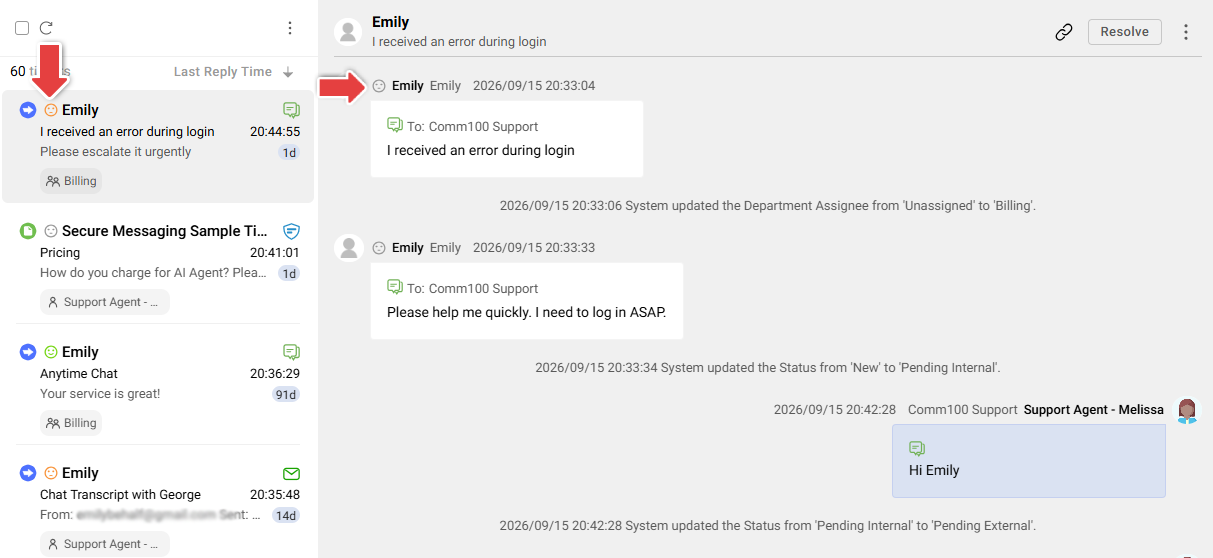
- Latest Sentiment represents the sentiment of the most recent successfully analyzed customer message. It does not represent the overall sentiment or sentiment trend of the entire ticket.
- Sentiment Analysis applies only to new eligible messages received after Sentiment Analysis is enabled for Ticketing & Messaging and the corresponding Channel Account. Existing messages are not analyzed retroactively.
To learn how to use Sentiment Analysis for Ticketing & Messaging, see this article.
Spotlights
You can now assign Spotlights to individual Ticketing & Messaging Channel Accounts. When a new eligible customer message is received, Comm100 analyzes the message and supported recent conversation context against the Spotlights assigned to that Channel Account.
When a Spotlight is detected, it appears as a label beside the corresponding message in the Agent Console. Agents can hover over the Spotlight to view the reason it was detected.
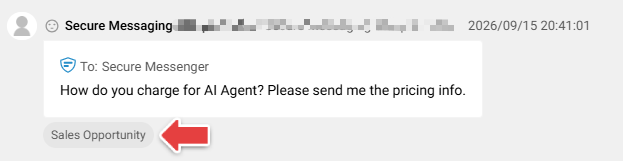
To learn how to use Spotlights for Ticketing & Messaging, see this article.
Triggers
This release also adds two AI Insights events to Ticketing & Messaging Triggers:
- When sentiment is evaluated
- When spotlight is detected
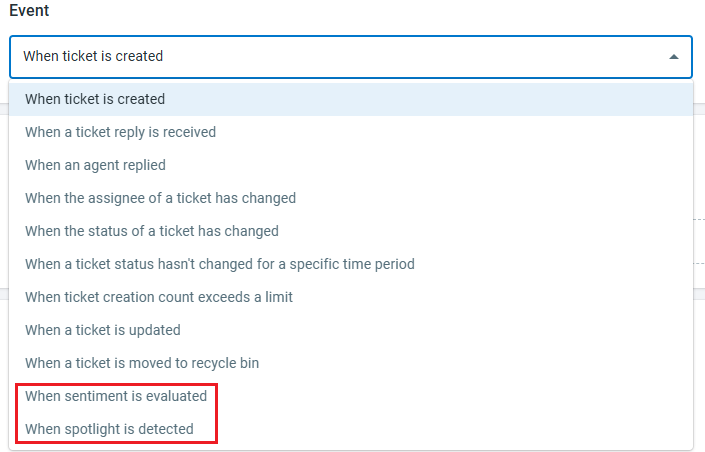
You can use these events together with Sentiment or Spotlight conditions to automatically perform follow-up actions when specific AI Insights results are detected. To learn how to set up Ticketing & Messaging Triggers, see this article.
System Fields
This release adds two system fields to Ticketing & Messaging:
- Latest Sentiment: Stores the sentiment of the most recent successfully analyzed customer message.
- Spotlights: Stores the distinct Spotlights detected from messages in the ticket.

These fields are updated automatically as analysis results become available. Depending on the feature, Latest Sentiment and/or Spotlights can also be used in other Ticketing & Messaging features, such as Routing Rules, SLA Policies, Views, and Custom Reports, helping you identify, prioritize, automate, and analyze tickets
based on AI Insights results.