A Service-Level Agreement (SLA) is a commitment between a service provider and a client that defines performance expectations and response timelines. In Comm100 Ticketing & Messaging, you can configure SLA policies to measure Time to First Response, Time to Next Response, and Time to Resolution for Tickets. These targets help ensure timely support and maintain service quality standards.
Step-by-Step Instructions
- Log in to your Comm100 Control Panel.
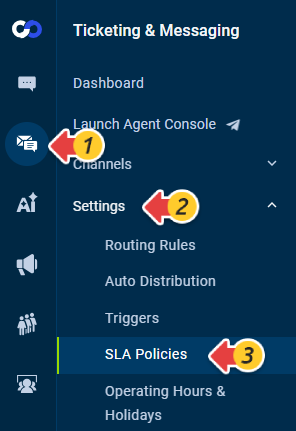
- From the left navigation menu, go to Ticketing & Messaging > Settings > SLA Policies.
- Click New SLA Policy.
- Enter a policy name and turn on the Enable toggle.
- In the Target section, define the response and resolution times (in hours and minutes) according to your business SLA commitments. Note: The First Response Time, Next Response Time, and Resolution Time must each be greater than or equal to five minutes.
- Choose the time calculation method under Operational hours:
- Calendar hours
SLA time runs continuously (24/7). Use this option if you provide round-the-clock support. - Operating hours
SLA time runs only during your team’s configured working hours. The SLA clock pauses outside of those hours.
You can configure working hours under Ticketing & Messaging > Settings > Operating Hours & Holidays.
- Calendar hours
- Set the Conditions that determine when the SLA policy applies (for example, based on ticket priority, department, or other criteria).
- Click Save.
Your SLA policy has been created. You can have multiple policies and make changes to an existing one when needed.Note: If multiple SLA Policies are matched, they are triggered in sequence according to their display order.