Problem
Automatic chat invitations are enabled for my website, but they do not always appear when expected.
Cause
An automatic chat invitation may not appear for one or more of the following reasons:
- The auto invitation is configured under a different campaign from the one currently used on the webpage.
- The auto invitation is not enabled.
- The visitor does not meet the conditions configured for the auto invitation.
- Only pop-up once per site visit is enabled, and the invitation has already appeared during the visitor’s current site visit.
- Hide invitation on mobile is enabled, and the visitor is accessing the website from a mobile device.
- Auto Distribution is enabled, but no agent is currently available to receive chats under the required distribution conditions.
Solution
To review your Auto Invitation settings, follow these steps:
- Log in to the Comm100 Control Panel.
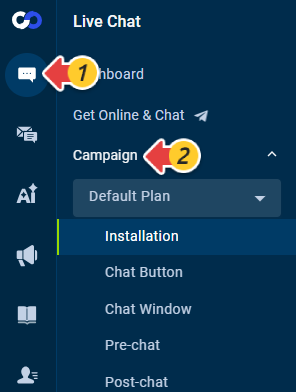
- From the left navigation menu, go to Live Chat > Campaign.
- Select the campaign used on the webpage where you expect the invitation to appear.
Note: If you are using Dynamic Campaign, make sure the target campaign currently applied to the visitor contains the Auto Invitation you want to use. The target campaign determines which invitation settings apply.
- Go to Invitation > Auto Invitations.
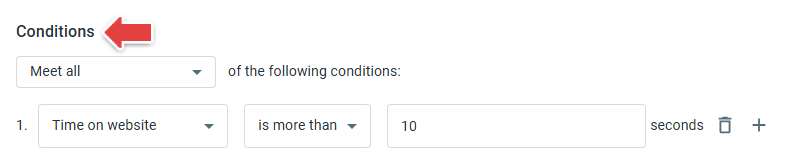
- Open the Auto Invitation and review its Conditions. Make sure the visitor meets all conditions required to trigger the invitation.
- Review the following options:
- If Only pop-up once per site visit is enabled, the invitation appears only once during the visitor’s site visit. Turn it off if you want the invitation to be able to appear again during the same visit.
- If Hide invitation on mobile is enabled, the invitation does not appear when visitors access your website from a mobile device.
- Click Save after making any changes..

If Auto Distribution is enabled, also verify that:
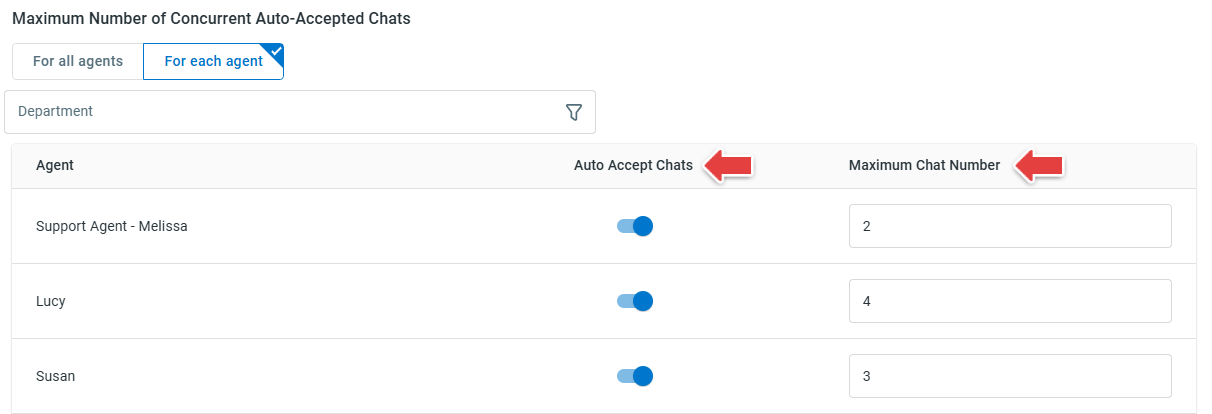
- Auto Accept Chats is enabled for agents.
- The Maximum Chat Number for online agents is greater than 0.
- Online agents have not reached their maximum number of concurrent chats.