
This release introduces Home, a customizable starting page in the Live Chat window where visitors can start a conversation, search Knowledge Base content, review recent chats, and access other support options.
You can enable and customize Home separately for each Live Chat campaign under Live Chat > Campaign > Home. Home supports the following:
- Branding: Customize the logo, title, and greeting message.
- Chat: Customize the title and description for the chat entry.
- Knowledge Base: Let visitors search a selected Knowledge Base and view popular articles directly from Home.
- Recent Chats: Display up to three recent conversations and provide access to additional chat history.
- Shortcuts: Add up to six Shortcuts for opening a URL, making a phone call, sending an email or SMS, or requesting Audio Chat or Video Chat.
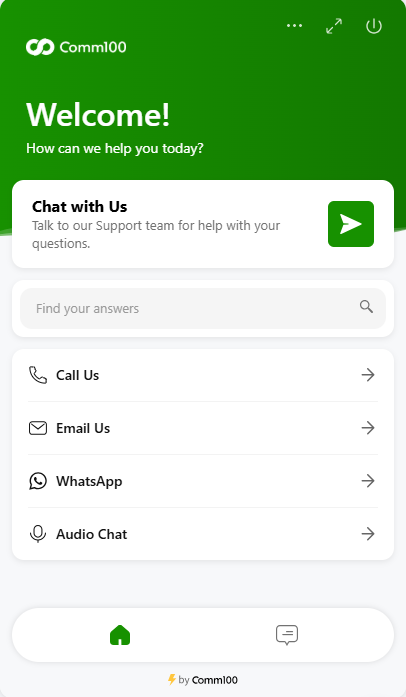
Visitors can switch between Home and Chat without interrupting an active conversation, making it easier to access self-service content and other support options while chatting.
Note: The previous KB Integration configuration is now managed under Home. Existing enabled KB Integration settings are automatically migrated to Home, including the selected Knowledge Base, greeting message, and search result limit. Popular articles are not enabled automatically after migration.
To learn more about customizing Home, see this article.