
Administrators and agents with permission to manage agents can reset the password for other agents in the Comm100 account. .
When resetting a password, the new password must meet the Password Policy configured for your account.
Note:
- Password Policy is enabled by default, and some minimum security requirements cannot be disabled. To learn more about the available settings and requirements, see this article.
- To learn how to configure agent permissions, see this article
Step-by-Step Instructions
- Log in to your Comm100 Control Panel.
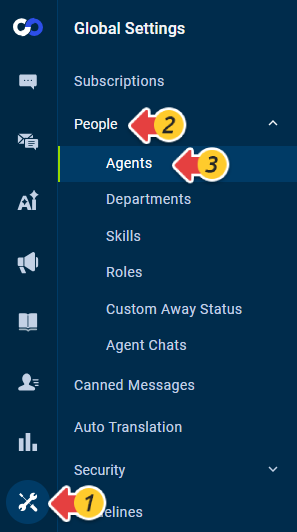
- From the left navigation menu, go to Global Settings > People > Agents.
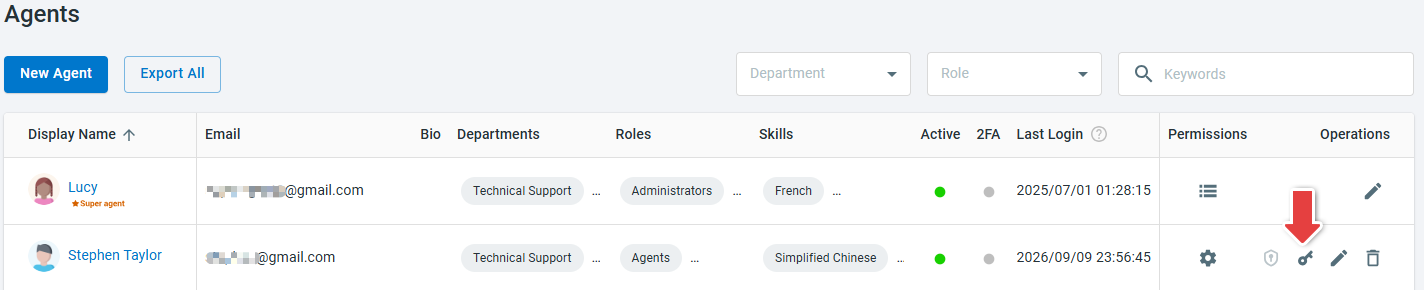
- Locate the agent whose password you want to reset, and click the Reset Password icon in the Operations column.
-
Enter a new password and enter it again to confirm.
- Click Save.

The agent can use the new password the next time they sign in to Comm100.