
A personalized live chat experience helps customers feel as if they are having a real, human conversation rather than interacting with an automated system. This approach strengthens relationships with both current and potential customers and builds trust over time.
Comm100 Live Chat enables you to deliver a more human and personalized customer experience through chat window customization, efficient access to customer information, and quick, relevant responses.
This article outlines the key features and best practices in Comm100 Live Chat to help you create a personalized customer experience:
- Use a pre-chat survey
- Address customers by name
- Show agent information to customers
- Leverage navigation history, wrap-up notes, and chat transcripts
- Send proactive chat invitations
- Use canned messages effectively
- Integrate Live Chat with your CRM
Use a Pre-chat Survey
The first step toward personalization is learning as much as possible about your customers before the chat begins. With Comm100 Live Chat, you can use a pre-chat survey to collect customer information in advance. This allows agents to start conversations with valuable context.
When configuring your pre-chat form, consider the following settings:
- Include your team name and agent avatars in the header.
- Include key fields such as:
- Name - so agents can address customers personally.
- Email/phone number - for post-chat follow-up.
- Product / Issue / Purpose - to understand why the customer is reaching out.
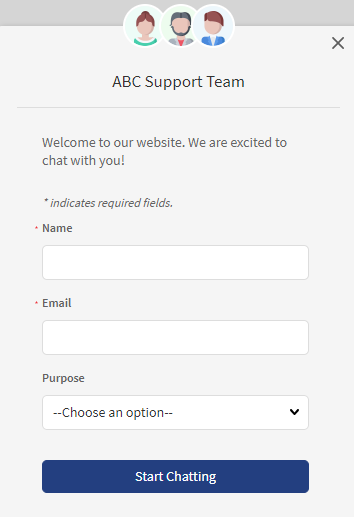
With the information collected, agents can be better prepared and deliver more relevant support.
To learn more about how to customize the pre-chat window, see this article.
Address Customers by Name
Customer names collected from the pre-chat survey can be used immediately when a chat starts. Addressing customers by name helps establish rapport and reduces the distance of an online conversation.
Agents can use the dynamic variable {!Visitor.Name} to create automatic greeting messages. Each agent can customize their own greeting to introduce themselves and welcome customers as soon as the chat begins. This not only makes customers feel acknowledged but also speeds up the start of the conversation.
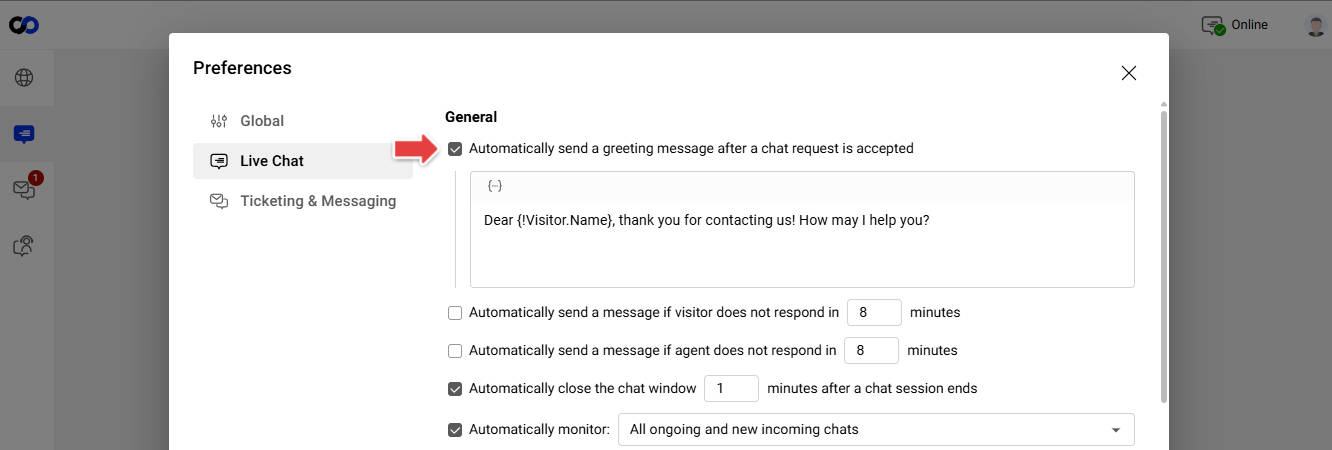
To learn more about how to customize the greeting message, see this article.
Show Agent Info to Customers
Displaying agent information in the chat window makes the experience feel more human and transparent. Knowing who they are chatting with helps customers build trust and feel more comfortable.
With Comm100 Live Chat, you can display the following agent details:
- Name: You can edit an agent's display name independent of their real name. This allows you to present a personal profile to customers while keeping agents' privacy.
- Avatar: Upload real or avatar profile photos for agents. Comm100 has a host of built-in avatars that can be used if desired.
- Title and bio: Edit the title and bio description for each agent.
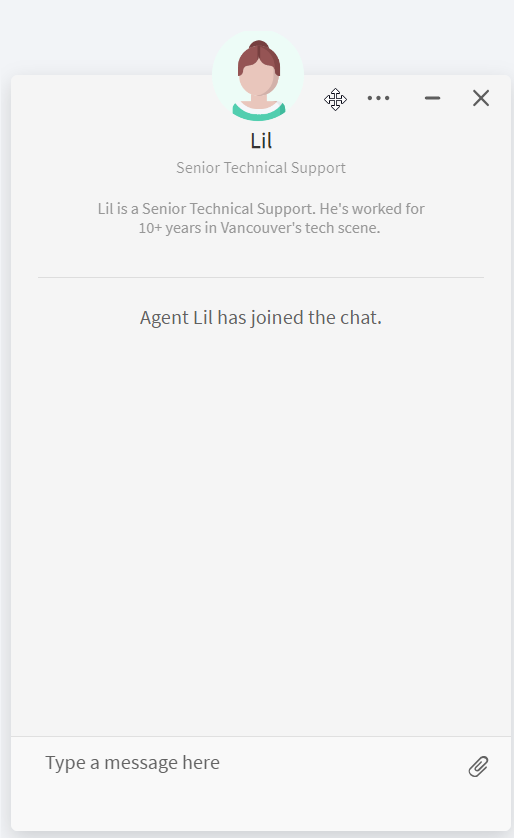
Agents' display name appears in the chat window by default. To show agents' avatar, title, and bio, you need to edit agents' information and include these elements in the Chat Window configurations.
- To learn more about how to edit agents' information, see this article.
- To learn more about how to customize the chat window, see this article.
Leverage Navigation History, Wrap-up, and Chat Transcripts
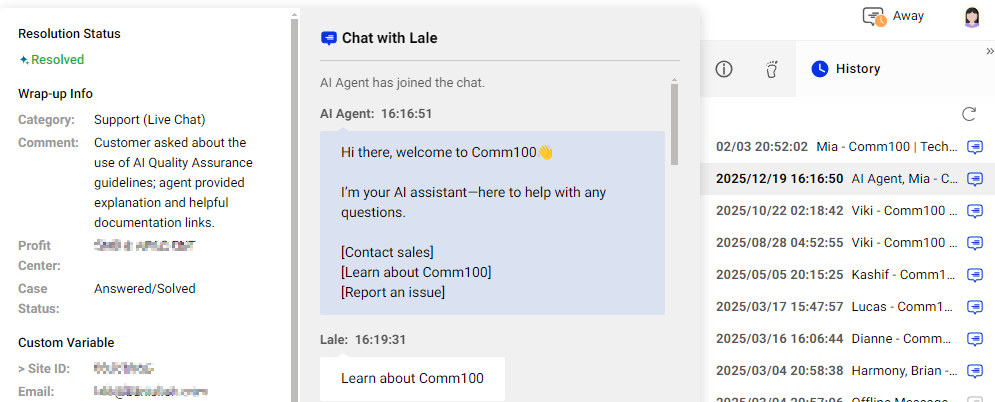
Comm100 Live Chat tracks visitors’ detailed footprints as long as the Live Chat JavaScript code is planted on your website. On the Agent Console, agents can see the webpages customers have visited and the time that customers spent on each page, which gives them an indication of the customer's interest.
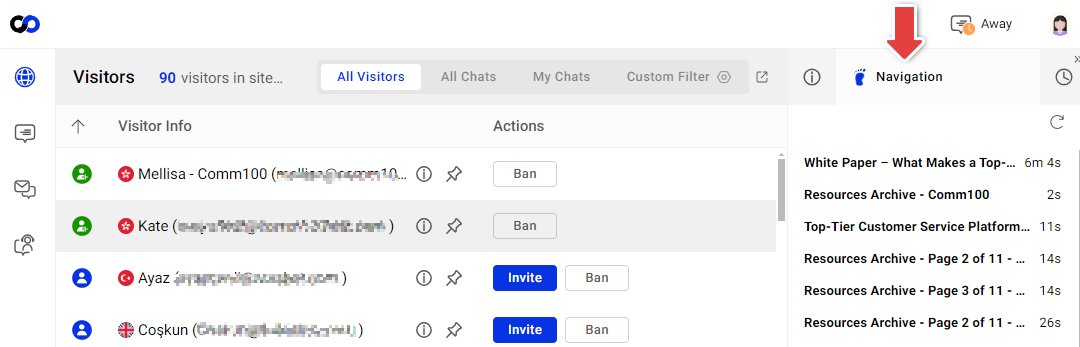
Customers' contact history (including chat transcripts, emails, and messages from other channels) and wrap-up history are available on the Agent Console. Agents can access the contact history and wrap-up notes of a customer conveniently during a chat. Checking chat transcripts and wrap up notes helps agents anticipate the reason for the customer's current visit, saving their time to repeat questions, and giving customers a feeling that they have been listened to.
Send Proactive Chat Invitations
Proactive chat invitations make your website visitors feel welcomed and create a sense of care for customers needing help. Comm100 Live Chat supports both Auto Invitation and Manual Invitation. You can customize the invitation message to keep a consistent style with your business.
- Auto Invitation
Send automatic greetings to your website visitors by setting up triggers, for example, to visitors who have visited repeatedly, or have stayed on your website for more than 30 seconds.
To learn more about how to set up Auto Invitation, see this article. - Manual Invitation
Agents can manually send chat invitations to a visitor when they monitor on-site visitors on the Agent Console.
To learn more about how to customize the manual invitation, see this article.
Use Canned Messages
Timely responses are important for a good online customer experience. Canned messages allow agents to reply quickly using a shortcut rather than typing the same answers repetitively. When using canned messages, be careful to avoid sounding like a robot.
- When creating canned messages, you can insert dynamic info such as customers' name and other information.
- When using the canned message, agents can edit the message according to the particular situation before sending it out.
- To learn more about the best practices for using canned messages, see this article.
- To learn more about how to create canned messages, see this article.
- To learn more about how to send canned messages, see this article.
Integrate Live Chat with Your CRM
A customer relationship management (CRM) software tracks customer information and manages all customer relationships. If you are using a CRM, integrate it with Comm100 Live Chat to grant agents access to the detailed information managed by the CRM. The information passed from the CRM, such as customer ID, purchase history, and prior complaint, allows agents to provide tailored service for each customer.
Comm100 supports integration with a variety of CRMs such as Salesforce and Dynamics 365. Visit here to find the integration guide with your CRM.