
This release introduces Archived Tickets in Ticketing & Messaging, allowing you to move resolved tickets out of regular ticket lists while keeping their history available for future reference. Resolved tickets that remain inactive for 30 days are automatically archived, and agents can also archive or unarchive eligible tickets manually.
A new Archived entry is available in the Ticketing & Messaging Agent Console, providing a dedicated place to access resolved tickets that no longer require active work.

With this enhancement:
- Resolved tickets are automatically archived after 30 days of inactivity. Any update to the ticket resets the 30-day period.
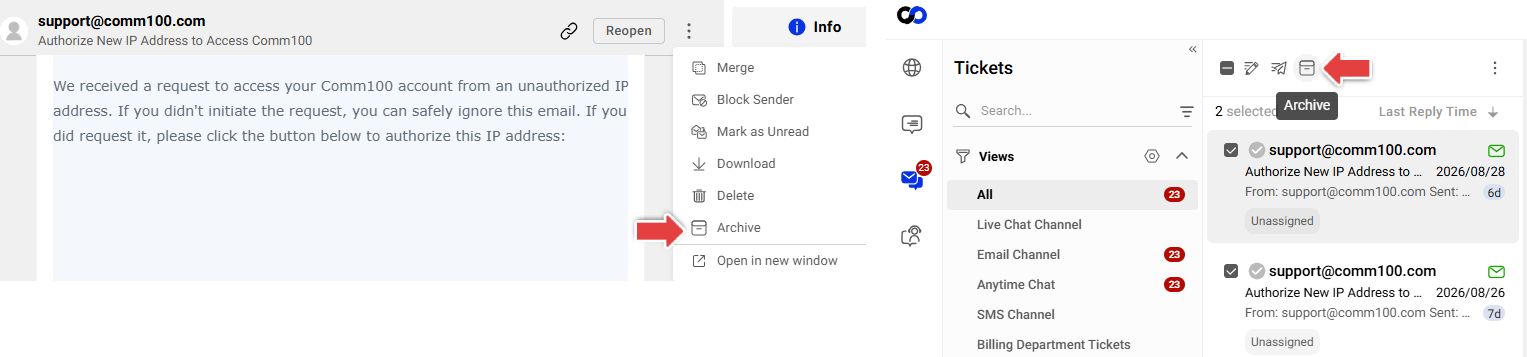
- Agents can manually archive resolved tickets individually or in bulk and restore them later using Unarchive.Note:
- To archive or unarchive tickets, agents must have the Archive Tickets permission.
- To access and view archived tickets, agents must have the View Archived Tickets permission.
- To archive or unarchive tickets, agents must have the Archive Tickets permission.
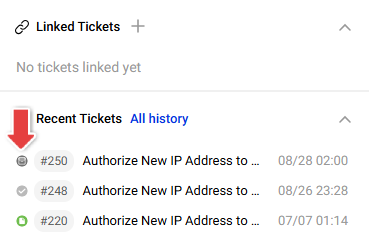
- Archived tickets remain accessible and searchable. They can appear in ticket search results and Recent Tickets history, with an archived indicator to distinguish them from regular tickets.
- Archived tickets are read-only. Agents can review ticket details and history, but replies, notes, and ticket fields cannot be edited until the ticket is unarchived.
- Archived tickets are removed from regular ticket lists, view counts, and unread counts, helping agents focus on tickets that still require attention.


With this release, existing eligible resolved tickets that have already had no updates for at least 30 days are automatically moved to Archived.