When creating a Topic for an AI Agent, you can define the Topic answer by workflow or by natural language. Using natural language allows you to give instructions to tell the AI Agent what to do if the topic matches, making it well-suited for scenarios that require flexibility, decision-making, or multi-step logic.
Instead of following a fixed path, the AI Agent can adapt to the conversation context, handle interruptions, and continue the flow naturally. For example, resuming a process after a user pauses. Instructions work best in combination with Functions and Actions. You can guide the AI Agent on when and how to call specific functions to complete a task, while actions can be used to send messages, collect information, or escalate conversations.
However, this flexibility comes with trade-offs, as instruction-based responses typically require more testing and fine-tuning to ensure consistent and accurate behavior.
- Instructions can guide the AI Agent to generate responses, take actions, and make decisions, but they must align with logical reasoning and realistic scenarios. For example, if you instruct the AI Agent to provide an obviously incorrect answer (such as “3” for “1+1”), it may ignore the instruction and return a correct response instead.
- For simple or fixed responses, using Workflow-based answers is recommended. To learn more about how to set up a topic, see this article.
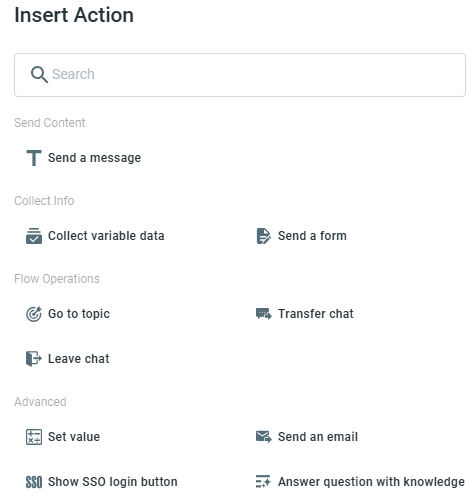
- Only a limited set of actions is supported within Instructions.
Sample Use Case
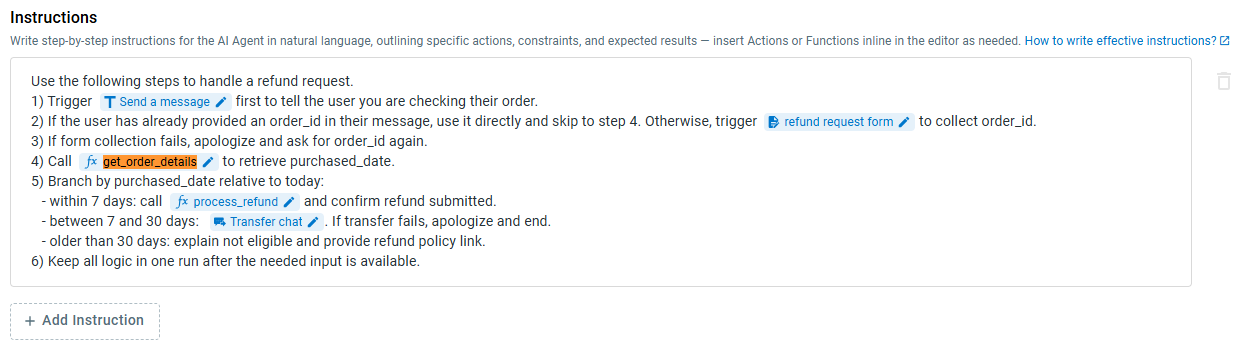
Topic: The user wants to request a refund.
Functions involved:
- get_order_details
- process_refund
Actions involved:
- Send a message: to inform the user that the order is being checked
- Send a form: to collect the order ID
- Transfer chat: to a human agent if the purchase date falls within a specific range
Sample Instructions: