
Comm100 provides a variety of actions for building AI Agent response flows. When configuring AI Agent Topics and Events, you can use these actions to define how the AI Agent responds and performs actions during a conversation.
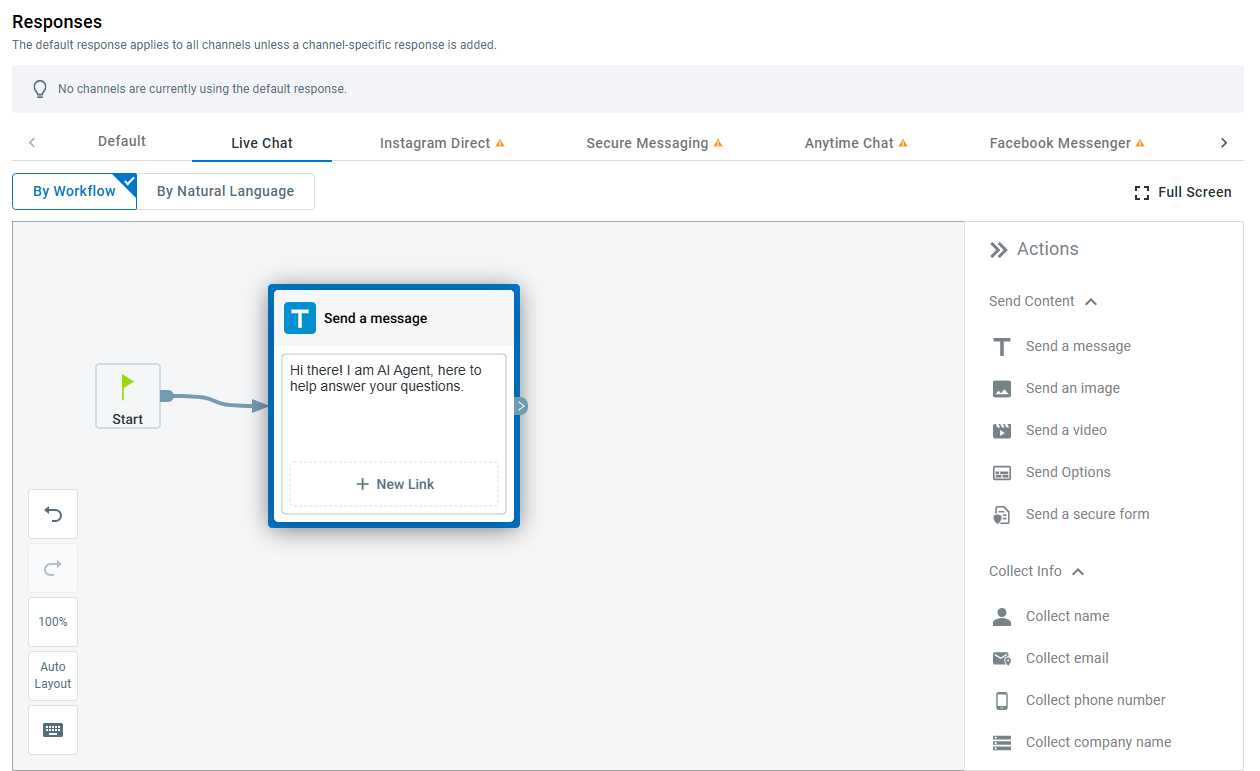
The following table lists the available AI Agent actions and the channels that support them.
Actions | Description | Supported Channels |
Send Content | ||
Send a message | This action allows you to send a message to the visitor. | All |
Send an image | This action allows you to send an image file or URL to the visitor. | All |
Send a video | This action allows you to send the URL of a video to the visitor. | Live Chat, Instagram Direct, Secure Messaging, Anytime Chat, Facebook Messenger, Twitter Direct Message, WeChat, WhatsApp, LINE, Telegram, Signal |
Send Options | This action allows you to send up to ten quick reply options to the visitor. Each quick reply option leads to a further AI Agent action. | All |
| Send a secure form | This action allows you to collect visitors' information securely during the chat using PCI DSS compliant forms. The data collected is only accessible to the first agent who joins the chat, and will not be stored or accessible after the chat ends. | All |
Collect Info | ||
Collect name | This action allows you to collect the name of the customer. This data is saved to the variable "Name." | All |
Collect email | This action allows you to collect the email address of the visitor. This data is saved to the variable "Email." | All |
Collect phone number | This action allows you to collect the phone number of the visitor. This data is saved to the variable "PhoneNumber." | All |
Collect company name | This action allows you to collect the company name of the visitor. This data is saved to the variable "CompanyName." | All |
Collect comment | This action allows you to collect comments from the visitor. This data is saved to the variable "Comment." | All |
Collect variable data | This action allows you to collect custom information from the visitor and save it to a variable, for example, Username. You can create any variable. The variable value will only exist when the current AI Agent is alive in a chat. | All |
Collect location | This action allows you to collect the visitor’s location. | Live Chat, Instagram Direct, Secure Messaging, Anytime Chat, Facebook Messenger, Twitter Direct |
Send a form | This action allows you to send a built-in form or custom form to the visitor. | Live Chat, Anytime Chat |
Collect file | This action allows you to collect files from visitors. The system supports a file of a maximum size is 50 MB, and the supported file formats include DOC, PDF, XLSX, MP4, and more. Unsupported file formats include EXE, SYS, SRC, CMD, BAT, RAR, DLL, COM, ISO, RM, AVI, TMP, MDF, MID, JAR, and DMG. | Live Chat, Anytime Chat |
Collect information | This action allows you to collect one or more Variables from the visitor. You can specify whether each Variable is required and provide instructions for how the AI Agent should identify or collect its value. | All |
Flow Operations | ||
Condition | This action allows you to create conditions in a flow builder. You can add multiple branches in a condition and multiple conditions in each branch. To learn more about the Conditions action, see this article. | All |
| Go to topic | This action allows you to initiate the answer flow of another topic. | All |
| Hand off | This action allows you to transfer the chat to a specific agent, department, another AI Agent, or transfer the chat based on routing rules. | All |
| Transfer chat cross sites | With cross-site chat transfer properly configured, you can use this action to transfer the chat to a specific agent, department, or AI Agent from another Comm100 site. | Live Chat |
Contact agent option | This action allows you to send an option which visitors can click to chat with a human-agent. | Live Chat |
Go to task bot | This action allows you to transfer the chat to a Task Bot. | Live Chat |
Leave chat | This action allows the AI Agent to leave the chat. | Live Chat |
| Auto monitor | This action allows you to add the chat to the chat list of a specified agent or department so that they can monitor the chat. | Live Chat |
Advanced | ||
Set value | This action allows you to set values for Bot Variables, Custom Variables and Pre-chat Field. | All |
Clear value | This action allows you to clear the values of one or more selected Variables or Custom Variables in a single execution. | All |
| Send an email | This action allows you to send an email to the visitor for better case follow-up or tracking, send an email to your team for records based on the scenario, send an email to visitors to collect feedback on the service you provided, and so forth. For the From server, you can use the Comm100 SMTP Server or a custom mail server configured with the Custom SMTP type. Custom mail servers configured with Microsoft 365 or Gmail are not available for this action. To learn more about Custom Mail Servers, see this article. | All |
Trigger a webhook | This action allows you to send and receive data to an external server or third-party services like Salesforce, Zendesk, Zapier, and so on, using Webhook. | All |
Show SSO login button | This action allows the visitor to log in via SSO. You can set a login button for visitors to log in and configure different branches for a successful and failed login. | Live Chat, Anytime Chat |
Book a meeting via Calendly | This action allows you to book meetings through Calendly. | Live Chat, Anytime Chat |
| Book a meeting via Microsoft Bookings | This action allows you to book meetings through Microsoft Bookings. | Live Chat, Anytime Chat |
| Change language | When the visitor types in a language different from the current language set for the Al Agent, Al Agent can change to the visitor's language and continue the conversation. | Live Chat |
| Achieve a goal | This action allows you to track the number of times that a specific action has been reached within the answer flow. | All |
| Answer question with knowledge | This action allows you to configure questions for the AI Agent to retrieve answers from Generative Answers. | All |
Salesforce | ||
| Create a record | This action allows you to create a record to Salesforce across the Live Chat and Ticketing & Messaging channels. The information collected is saved into record fields in Salesforce. A record ID is created and saved to a variable. To learn more about the action, see this article. | All |
| Find a record | This action allows you to find a record in Salesforce by a field value. You can then save the field values of the found record into bot variables so that you can use them later in the flow. To learn more about the action, see this article. | All |
| Find a record by SOQL | This action allows you to write the advanced search statement to find records in Salesforce in the Intent-Answer or Event Messages flow builder across the Live Chat and Ticketing & Messaging channels. This action can be used where you do not get the desired results from the Find a record action. To learn more about the action, see this article. | All |
Dynamics 365 | ||
| Create a record | This action allows you to create a record to Dynamics 365 across the Live Chat and Ticketing & Messaging channels. The information collected is saved into record fields in Dynamics 365. A record ID is created and saved to a variable. To learn more about this action, see this article. | All |
| Find a record | This action allows you to find a record in Dynamics 365 by a field value. You can then save the field values of the found record into bot variables so that you can use them later in the flow. To learn more about this action, see this article. | All |
| Find a record by FetchXML | This action allows you to write the advanced search statement to find records in Dynamics 365 in the Intent-Answer or Event Messages flow builder across the Live Chat and Ticketing & Messaging channels. This action can be used where you do not get the desired results from the Find a record action. To learn more about this action, see this article. | All |
Canvas | ||
| Find records | This action allows you to find records in Canvas by a field value. You can then save the field values of the found record into bot variables so that you can use them later in the flow. To learn more about this action, see this article. | All |