
Comm100 Ticketing & Messaging can be integrated with Comm100 Live Chat, allowing you to convert offline messages and chat transcripts into tickets. You can then track and follow up on chats and offline messages in the Ticketing & Messaging module of the Agent Console.
Step-by-Step Instructions
- Log in to the Comm100 Control Panel.
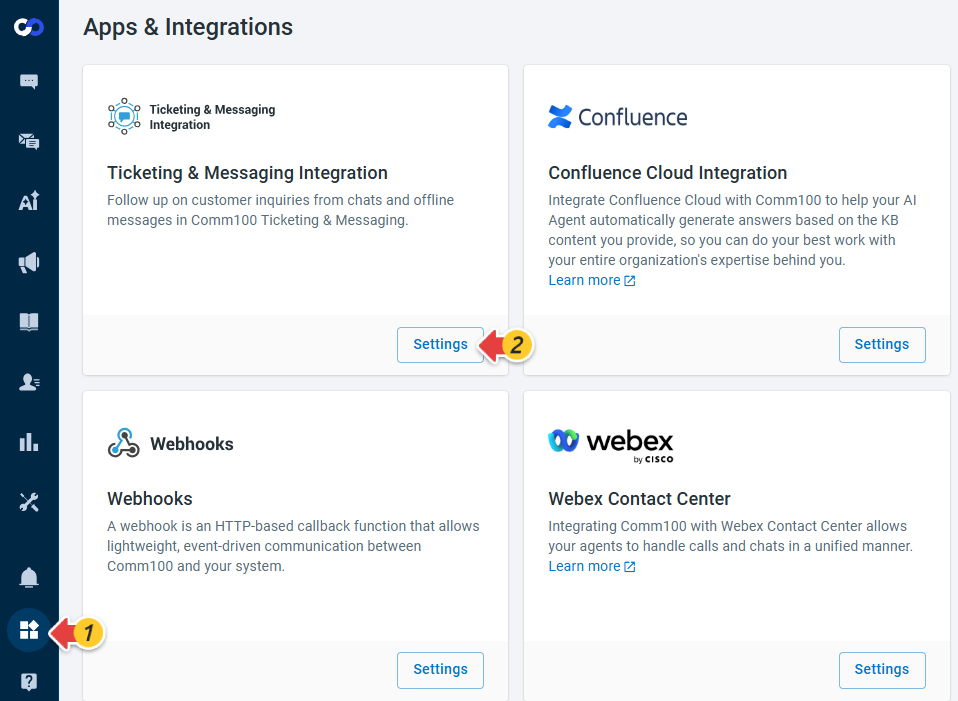
- From the left navigation menu, go to Apps & Integrations.
- Locate the Ticketing & Messages Integration card and click Settings.
- Turn on Comm100 Ticketing & Messaging Integration. By default, the options for manually creating tickets from chats and offline messages in the Agent Console and Control Panel are selected.
- To automatically create tickets from offline messages, select Automatically create tickets for offline messages. Once enabled, offline messages submitted by visitors are automatically created as tickets with OfflineMessage as the source.
- Click Save.


The Ticketing & Messaging integration with Live Chat is now enabled. To learn how to manually convert a chat to a ticket during a chat session, see this article.