
What is Live Chat Queue
The Live Chat Queue is automatically enabled when the Auto Distribution is activated.
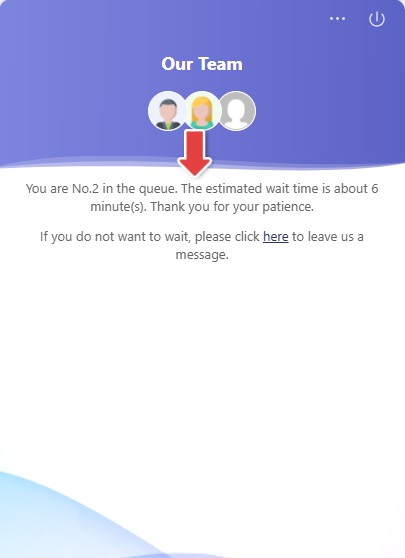
When Auto Distribution is enabled and all agents have reached their maximum number of concurrent chats, new visitors will be placed in a chat queue. Visitors in the queue are notified of their position while waiting for the next available agent. If they prefer not to wait, visitors can also choose to leave an offline message.
- To learn more about the Auto Distribution feature, see this article.
- To learn how Estimated Wait time for visitors in the chat queue is calculated, see this article.
- Live Chat Queue is different from Comm100 Queue Management, which is a standalone product independent of Comm100 Live Chat. Comm100 Queue Management is a digital solution designed for businesses to handle customers waiting in queue to get services. To learn more about Comm100 Queue Management, see this article.
Limiting Chat Queue Length
To prevent excessively long wait times and improve the visitor experience, Comm100 allows you to limit the chat queue length. When the configured limits are reached, new visitors will not be able to enter the queue until the queue length returns to an acceptable level.
- Log in to the Comm100 Control Panel.
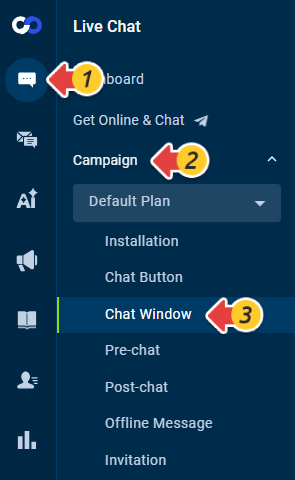
- From the left navigation menu, go to Live Chat > Campaign > Chat Window. If you have multiple campaigns, make sure to choose the correct one from the drop-down list.
- Scroll down and expand the Advanced section.
- Select the Limit chat queue length checkbox, and set the maximum number of visitors allowed in the chat queue or the maximum estimated wait time. You can also customize the message displayed to visitors when they are unable to join the queue.
- Click Save.

Chat Queue Report
Comm100 provides a report for chat queue, giving you a comprehensive view of the number of visitors involved in chat queue. The queue report encompasses a range of queue metrics including the number of visitors who waited in the queue, abandoned the queue, switched to message, or were refused by agents within a specific time range.

To learn more about Comm100 reports, see this article.