Comm100 Live Chat provides flexible customization options that allow you to tailor the chat experience to your business needs and branding. If your team does not provide 24/7 support, you can configure the chat button to automatically hide when no agents are online.
Step-by-Step Instructions
To hide the chat button when your team is offline, follow these steps:
- Log in to your Comm100 Control Panel.
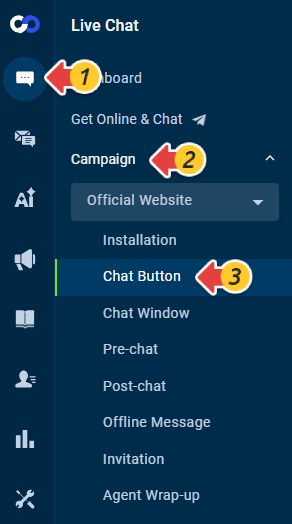
- From the left menu, go to Live Chat > Campaign > Chat Button. If you are using multiple campaigns, select the appropriate campaign from the drop-down list.
- Expand the Advanced section.
- Select the Hide chat button when my team is offline checkbox.Note: The Hide chat button when my team is offline feature requires the Live Chat code installed on your website to use the JavaScript version.
- Click Save.