The Audit Log records agent activities across your Comm100 site. It tracks important actions performed in different Comm100 modules, helping administrators monitor system usage, troubleshoot issues, and maintain security compliance.
Note: The Audit Log is only available in Ultra plans. To learn more about Comm100 product plans, visit here.
Step-by-Step Instructions
- Log in to your Comm100 Control Panel.
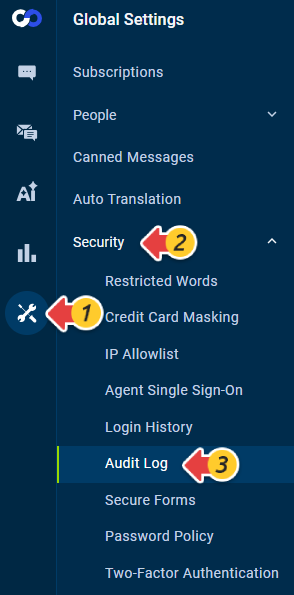
- From the left navigation menu, go to Global Settings > Security > Audit Log.
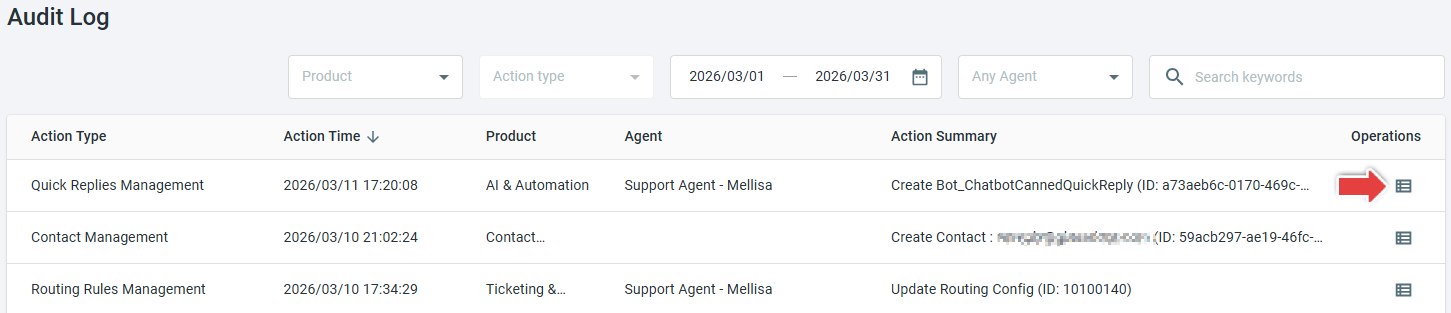
- Use the available filters to search for specific logs. You can filter by Product, Action Type, Time Range, Agent, or Keywords.
- After applying the filters, the matching records will appear in the list.
- To view more details about a specific activity, click the Action detail icon in the Operations column.
For example, if you want to find out who deleted chat transcripts recently, you can select Live Chat as the Product and Transcript Management as the Action type, or simply enter the keyword Delete Chat.