
Yes, you can put your own branding/banner image (logo) in the visitor side window including Chat Window, Offline Message Window, and Pre-Chat Window.
- Chat Window is used by visitors to chat with your agents.
- Offline Message window is used for your website visitors to leave an offline message when the status of a chat button is offline.
- Pre-Chat window is a window where your visitors need to enter their information before initiating a chat request. It enables agents to know more about visitors before accepting their chats.
Step-by-Step Instructions
- Log in to your Comm100 Control Panel.
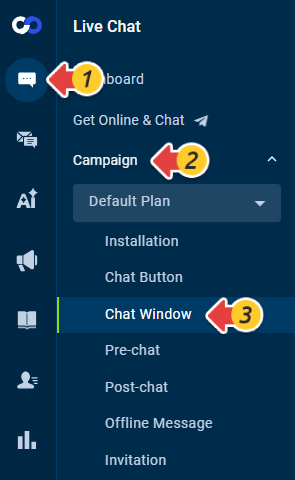
- From the left navigation bar menu, go to Live Chat > Campaign > Chat Window.
- Go to the Header section, click Banner image and Select banner image.
- You can select one branding image from our gallery or click Upload Files to upload your own image.Note: The recommended dimensions for your custom branding image are 406 × 86 pixels, and the maximum file size is 1.0 MB.
- Click OK.
- Click Save.

Now you have successfully put the branding image onto the chat window. The new setting will take effect on the pre-chat window and offline message window automatically and immediately. You can refresh your website and then click the chat button to see how the setting works to your satisfaction.